Here is a rough way to implement the Yocto for hailort.(using yocto kirkstone/4.0 as example)
- Meta-Hailo sources can be cloned from GitHub using:
git clone https://github.com/hailoai/meta-hailo.git
- After cloning meta_hailo, checkout a specific branch, for example (for Kirkstone)
cd meta-hailo
git checkout kirkstone
- The Yocto directory of all supported Yocto releases includes the meta-hailo layers. Open the directory of your required Yocto release and copy the meta-hailo layer directory to your sources directory (same directory as poky, meta-openembedded etc.). Then add it to your conf/bblayers.conf like so:
BBLAYERS += " \
/home/alex/Work/imotion/poky/meta-hailo/meta-hailo-accelerator \
/home/alex/Work/imotion/poky/meta-hailo/meta-hailo-libhailort \
"
- Add the recipes to your image in conf/local.conf:
IMAGE_INSTALL:append = " libhailort hailortcli hailo-pci hailo-firmware"
All above here is pretty the same as our Hailort document, please pay more attention on how to help china mainland customer to add hailort on yocto.(because the bad speed for yocto and GitHub on mainland china).
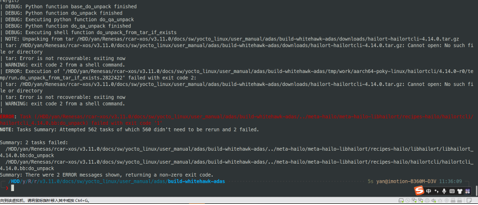
- Because hailort contained a lot of external GitHub, some of them is from google. It always had similar error like this if we directly build the yocto from the document.
- We first prepared one clean hailort GitHub which had all the external GitHub already downloaded and set the “hailort/CMakeLists.txt” parameter “HAILO_OFFLINE_COMPILATION” as “ON”. Please check the GitHub: https://github.com/alex2014git/hailort.git (we may only keep the latest version.)
- Please update the meta-hailo after previous step 2.

回复 alex 取消回复